Introduction
In today’s digital world, high-quality images are no longer optional—they’re essential. Whether you’re a content creator, photographer, social media manager, or just someone who loves sharing photos, having access to powerful editing tools can make a huge difference. Best Free Photo Editing Software Tools 2026.
The good news? You don’t need to spend money on expensive software like Photoshop anymore. There are plenty of free photo editing tools that deliver professional-level results.
Best photo editing software
In this guide, we’ll explore the best free photo editing software in 2026, compare their features, and help you choose the right one for your needs.
| Software | Platform | Best For | Key Feature |
|---|---|---|---|
| GIMP | Windows, Mac, Linux | Advanced users | Photoshop-like tools |
| Canva | Web, Mobile | Beginners | Drag-and-drop design |
| Photopea | Web | PSD editing | No installation needed |
| Pixlr | Web, Mobile | Quick edits | AI filters & effects |
| Snapseed | Mobile | Mobile editing | Pro-level tools |
| Darktable | Windows, Mac, Linux | RAW editing | Lightroom alternative |
| Fotor | Web, Mobile | Casual users | One-click enhancement |
What to Look for in Best Free Photo Editing Software
Online photo editor free
Before choosing a tool, consider these key factors:
Ease of Use
If you’re a beginner, go for intuitive interfaces like Canva or Fotor. Advanced users may prefer GIMP or Darktable. Best Free Photo Editing Software Tools 2026.
Features
Look for essential features like:
- Layers & masks
- Filters & effects
- RAW image support
- AI tools
Compatibility
Make sure the software works on your device (Windows, Mac, Android, iOS, or browser-based).
Performance
Lightweight tools like Photopea run smoothly even on low-end devices.
Limitations
Free tools may include:
- Ads
- Limited exports
- Missing premium features
7 Best Free Photo Editing Software in 2026
1. GIMP (Best Overall Free Alternative to Photoshop)
GIMP (GNU Image Manipulation Program) is widely considered one of the best free photo editing software options available for professional-level image editing. As a powerful open-source editor, GIMP offers advanced tools similar to Adobe Photoshop, including layers, masks, filters, customizable brushes, and plugin support. It is available for Windows, macOS, and Linux, making it a versatile solution for designers, photographers, and digital artists. Best Free Photo Editing Software Tools 2026.
One of GIMP’s biggest strengths is its flexibility and customization. Users can install third-party plugins, create scripts, and personalize the workspace according to their workflow. The latest versions of GIMP also include non-destructive editing features, improved PSD support, advanced color management, and enhanced text styling tools, making it more powerful than ever.
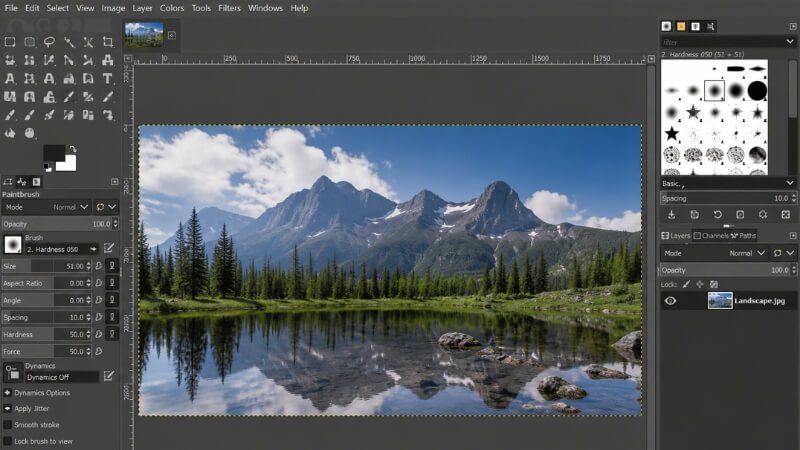
GIMP supports a wide range of image formats, including JPEG, PNG, GIF, TIFF, PSD, and WebP. It is especially useful for tasks such as photo retouching, background removal, graphic design, digital painting, and image manipulation. Because it’s completely free and community-driven, users get access to professional editing capabilities without any subscription fees.
However, beginners may find the interface slightly overwhelming at first due to the large number of tools and advanced settings. Still, once mastered, GIMP becomes an incredibly powerful alternative to premium editing software. Best Free Photo Editing Software Tools 2026.
Key Features:
- Advanced layer and masking system
- Plugin and script support
- High-quality photo retouching tools
- Non-destructive editing features
- Cross-platform compatibility
Pros:
- 100% free and open-source
- Professional-grade editing tools
- Supports multiple file formats
- Huge community and tutorial support
Cons:
- Steeper learning curve for beginners
- Interface feels less modern compared to paid software
👉 Best For: Professional editors, graphic designers, photographers, and advanced users looking for a free Photoshop alternative.
2. Canva (Best for Beginners & Social Media)
Canva is one of the most popular free photo editing and graphic design platforms for beginners, content creators, bloggers, and marketers. Known for its simple drag-and-drop interface, Canva allows users to create stunning social media graphics, presentations, posters, thumbnails, and edited photos without needing advanced design skills. It works directly in your web browser and also offers mobile apps for Android and iPhone users.
One of Canva’s biggest advantages is its massive library of templates, stock images, icons, fonts, and design elements. Users can quickly customize professional-looking designs for Instagram posts, YouTube thumbnails, Pinterest pins, business cards, and more. Canva also includes AI-powered tools like background remover, Magic Edit, and automatic resizing for different social media platforms. Best Free Photo Editing Software Tools 2026.
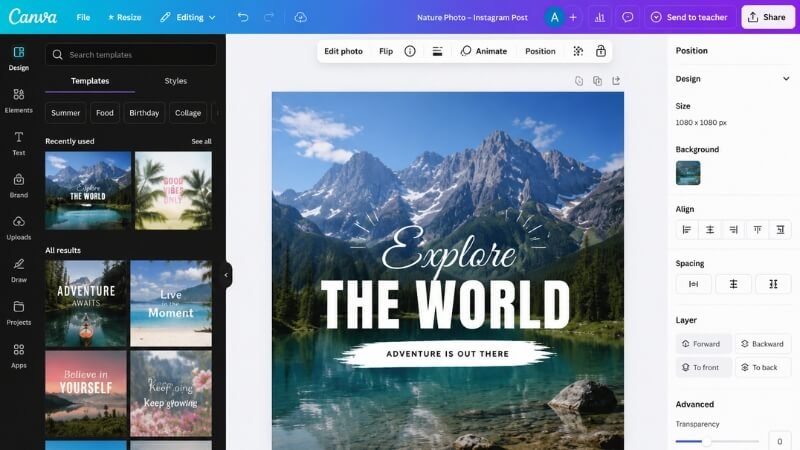
Unlike traditional photo editing software, Canva focuses heavily on simplicity and speed. This makes it perfect for users who want quick edits and attractive visuals without spending hours learning complex tools. The free version provides enough features for most casual and professional users, although some premium templates and assets require a paid subscription.
Canva also supports collaboration, allowing teams to work on projects together in real time. Whether you’re editing photos, designing graphics, or creating marketing content, Canva remains one of the best free tools available online.
Key Features:
- Drag-and-drop photo editor
- Thousands of customizable templates
- AI-powered editing tools
- Built-in stock photos and icons
- Cloud-based editing and storage
Pros:
- Extremely beginner-friendly
- Fast and easy to use
- Perfect for social media content
- No software installation required
Cons:
- Limited advanced photo editing features
- Some premium assets locked behind paid plans
👉 Best For: Beginners, bloggers, social media creators, marketers, and non-designers.
3. Photopea (Best Browser-Based Editor)
Photopea is a powerful browser-based photo editing software that closely resembles Adobe Photoshop in both appearance and functionality. It is one of the best free online photo editors for users who need professional editing tools without downloading any software. Because it runs entirely in a web browser, Photopea works smoothly on Windows, Mac, Linux, and even Chromebooks.
One of Photopea’s standout features is its compatibility with professional file formats such as PSD, AI, XD, Sketch, PDF, and RAW files. This makes it incredibly useful for designers, photographers, and students who want to edit Photoshop files for free. The interface is very similar to Photoshop, making it easier for experienced users to switch without a learning curve. Best Free Photo Editing Software Tools 2026.
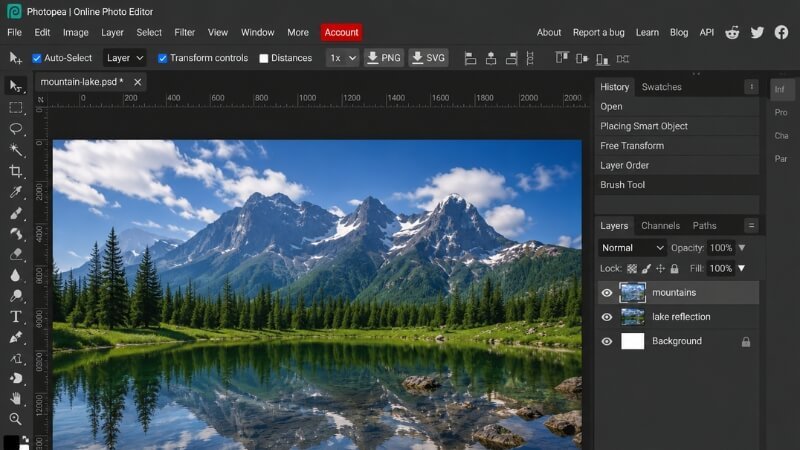
Photopea includes advanced editing tools such as layers, masks, smart objects, blending modes, selection tools, and filters. Users can perform complex photo manipulations, create graphic designs, remove backgrounds, and edit professional projects directly from their browsers. Despite being free, it delivers surprisingly strong performance even on lower-end devices.
Because it’s browser-based, Photopea does display ads in the free version. However, its powerful features and accessibility make it one of the best free alternatives to expensive desktop editing software.
Key Features:
Works directly in web browsers
Supports PSD, AI, XD, and RAW files
Advanced layers and masking tools
Photoshop-like user interface
No installation required
Pros:
Completely accessible online
Great for editing PSD files
Lightweight and fast
Works on almost any device
Cons:
- Ads in the free version
- Requires internet connection for use
👉 Best For: Photoshop users, students, web designers, and users who need advanced online editing tools.
4. Pixlr (Best for Quick Edits)
Pixlr is a fast, lightweight, and beginner-friendly free photo editing software designed for quick edits and creative enhancements. It is available as both a web application and a mobile app, making it a convenient option for users who want professional-looking results without complicated editing tools. Best Free Photo Editing Software Tools 2026.
One of Pixlr’s biggest strengths is its AI-powered editing features. Users can quickly remove backgrounds, apply filters, adjust lighting, and enhance photos with just a few clicks. The software also offers overlays, effects, stickers, and templates, making it ideal for creating social media graphics and promotional visuals.
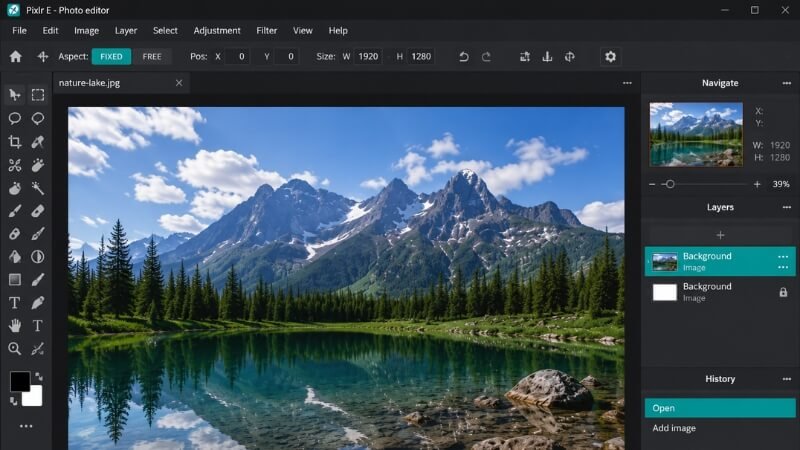
Pixlr comes in two versions: Pixlr X for beginners and Pixlr E for more advanced users. This allows users to choose a workspace that matches their editing experience. The clean and modern interface makes navigation simple, even for first-time users. Best Free Photo Editing Software Tools 2026.
Since Pixlr is cloud-based, users can access their projects from different devices without installing heavy software. While the free version contains ads and some limitations, it still offers excellent value for casual editing and fast design work.
Key Features:
- AI-powered editing tools
- One-click background remover
- Filters, overlays, and effects
- Web and mobile compatibility
- Beginner-friendly interface
Pros:
- Fast and lightweight
- Easy for beginners to use
- Great for quick social media edits
- No heavy installation needed
Cons:
- Free version includes ads
- Limited advanced editing features
👉 Best For: Bloggers, social media creators, beginners, and users who need quick photo edits.
5. Snapseed (Best Mobile Photo Editor)
Snapseed is a professional-quality mobile photo editing app developed by Google. It is widely regarded as one of the best free photo editing apps for Android and iPhone users because of its powerful tools, clean interface, and completely ad-free experience. Best Free Photo Editing Software Tools 2026.
Unlike many mobile editors that focus only on filters, Snapseed provides advanced editing capabilities such as RAW photo editing, healing tools, selective adjustments, curves, white balance control, and perspective correction. These features allow users to make professional-level edits directly from their smartphones. Photo editing apps free.
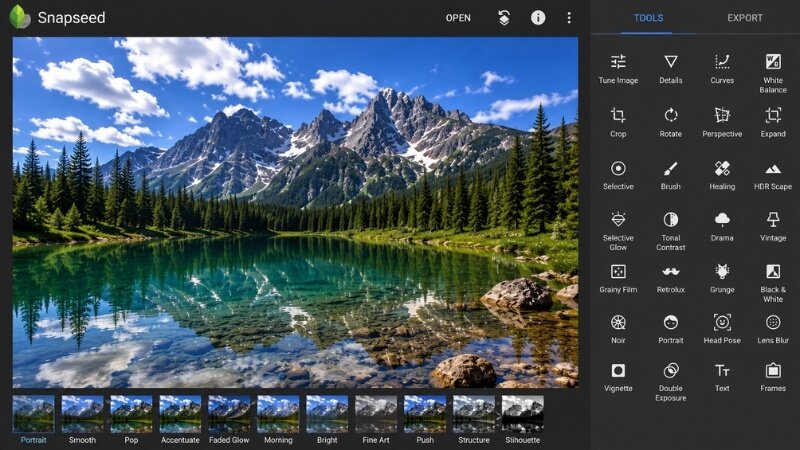
Snapseed’s interface is intuitive and gesture-based, making editing smooth and efficient. Users can apply subtle enhancements or dramatic effects with precision. The app also includes professional filters, portrait retouching options, and detailed control over brightness, contrast, saturation, and sharpness. Best Free Photo Editing Software Tools 2026.
Another major advantage is that Snapseed does not place watermarks on edited images, even in the free version. This makes it ideal for photographers, influencers, and content creators who need high-quality mobile editing tools without paying for subscriptions.
Photo editing apps free
Key Features:
- Professional mobile editing tools
- RAW image support
- Healing and selective editing tools
- No ads or watermarks
- Advanced color and lighting adjustments
Pros:
- Completely free to use
- Professional editing on mobile devices
- Clean and easy-to-use interface
- High-quality export results
Cons:
- Mobile-only application
- Limited graphic design features
👉 Best For: Mobile photographers, influencers, travelers, and smartphone content creators.
6. Darktable (Best for RAW Editing)
Darktable is a powerful open-source RAW photo editing software designed specifically for photographers and advanced image editors. Often compared to Adobe Lightroom, Darktable provides professional-level tools for managing and enhancing RAW images without requiring a paid subscription. Best Free Photo Editing Software Tools 2026.
The software focuses heavily on non-destructive editing, meaning users can make unlimited adjustments without permanently altering the original image. Darktable includes advanced features such as tone mapping, color correction, sharpening, noise reduction, and exposure adjustments, giving photographers precise control over every aspect of their photos.
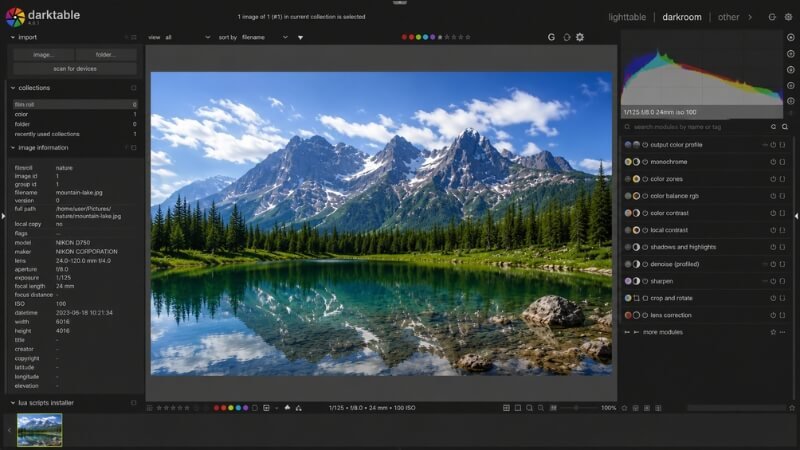
Darktable also supports professional photography workflows with features like tethered shooting, image tagging, metadata management, and batch processing. It works on Windows, macOS, and Linux, making it accessible across multiple platforms.
Although the interface can feel complex for beginners, experienced photographers appreciate the depth of control and customization it offers. For anyone serious about photography and RAW editing, Darktable is one of the best free alternatives to Lightroom available today. Best Free Photo Editing Software Tools 2026.
Key Features:
- Advanced RAW photo editing
- Non-destructive editing workflow
- Professional color correction tools
- Batch image processing
- Photo management system
Pros:
- Excellent RAW editing capabilities
- Completely free and open-source
- Ideal for professional photography
- Advanced workflow management
Cons:
- Steeper learning curve
- Interface may overwhelm beginners
👉 Best For: Professional photographers, RAW image editors, and advanced photography enthusiasts.
7. Fotor (Best for One-Click Enhancements)
Fotor is a simple yet powerful free photo editing software designed for users who want fast, attractive, and hassle-free image editing. With its clean interface and AI-powered tools, Fotor makes it easy for beginners to enhance photos, create collages, and design social media graphics within minutes.
One of Fotor’s standout features is its one-click photo enhancement technology, which automatically improves lighting, color balance, and image sharpness. Users can also apply filters, beauty retouching effects, frames, stickers, and text overlays to make their photos more visually appealing.
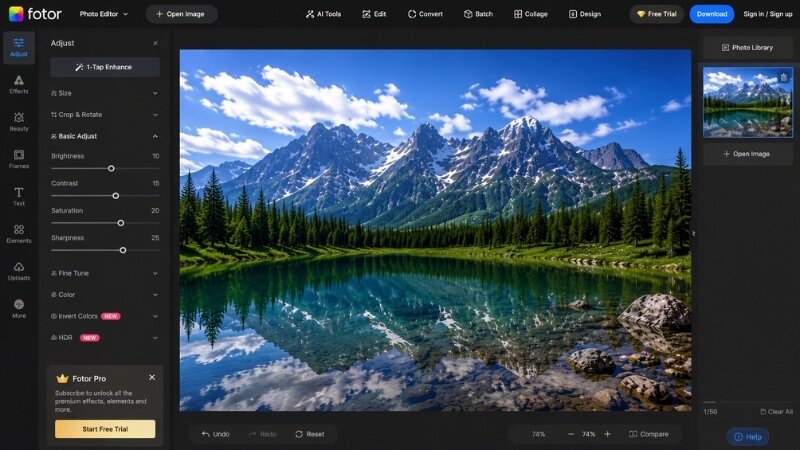
Fotor works on web browsers, desktop devices, and mobile phones, giving users flexibility across different platforms. The software is especially popular among casual users, bloggers, and influencers who want polished images without learning advanced editing techniques. Best Free Photo Editing Software Tools 2026.
While the free version includes some limitations and premium-only features, it still provides enough functionality for everyday editing needs. Its combination of simplicity, speed, and attractive design tools makes it one of the best free photo editing apps for casual creators.
Key Features:
- One-click AI photo enhancement
- Beauty retouching tools
- Filters, effects, and collage maker
- Web, desktop, and mobile support
- Beginner-friendly editing interface
Pros:
- Very easy to use
- Fast editing results
- Great for casual users
- Attractive built-in filters and templates
Cons:
- Some premium features locked
- Occasional ads in free version
👉 Best For: Casual users, bloggers, influencers, and beginners looking for quick photo enhancements.
Best Free Photo Editors by Use Case
- Beginners: Canva, Fotor
- Professionals: GIMP, Darktable
- Online Editing: Photopea, Pixlr
- Mobile Editing: Snapseed
- Low-End Devices: Photopea, Pixlr
| Feature | Free Software | Paid Software |
|---|---|---|
| Cost | Completely free | Subscription or one-time payment |
| Features | Basic to moderately advanced | Full professional tools & features |
| Ease of Use | Often beginner-friendly | Can be complex but powerful |
| Ads/Watermarks | May include ads or watermarks | No ads or watermarks |
| Support | Community forums, limited help | Dedicated customer support |
| Updates | Less frequent | Regular updates & new features |
| Cloud Integration | Limited or none | Full cloud storage & sync |
| Performance | May be slower or limited | Optimized for performance |
👉 When to Upgrade:
If you need advanced features like AI automation, cloud storage, or professional workflows, consider paid tools like Adobe Photoshop or Lightroom.
Pro Tips for Choosing the Right Tool
- Identify your needs (social media, photography, design) Best Free Photo Editing Software Tools 2026.
- Check device compatibility
- Test multiple tools before committing
- Start simple, then upgrade if needed
FAQ
Best Free Video Editing Software for Beginners (2026 Guide)
How to Use AI for Content Research in 2026
Conclusion
There’s no shortage of excellent free photo editing software in 2026. Whether you’re a beginner or a professional, there’s a tool tailored to your needs.
- Go with Canva for simplicity
- Choose GIMP for advanced editing
- Use Photopea for browser-based work
- Try Snapseed for mobile editing